
%207.svg)

.svg)

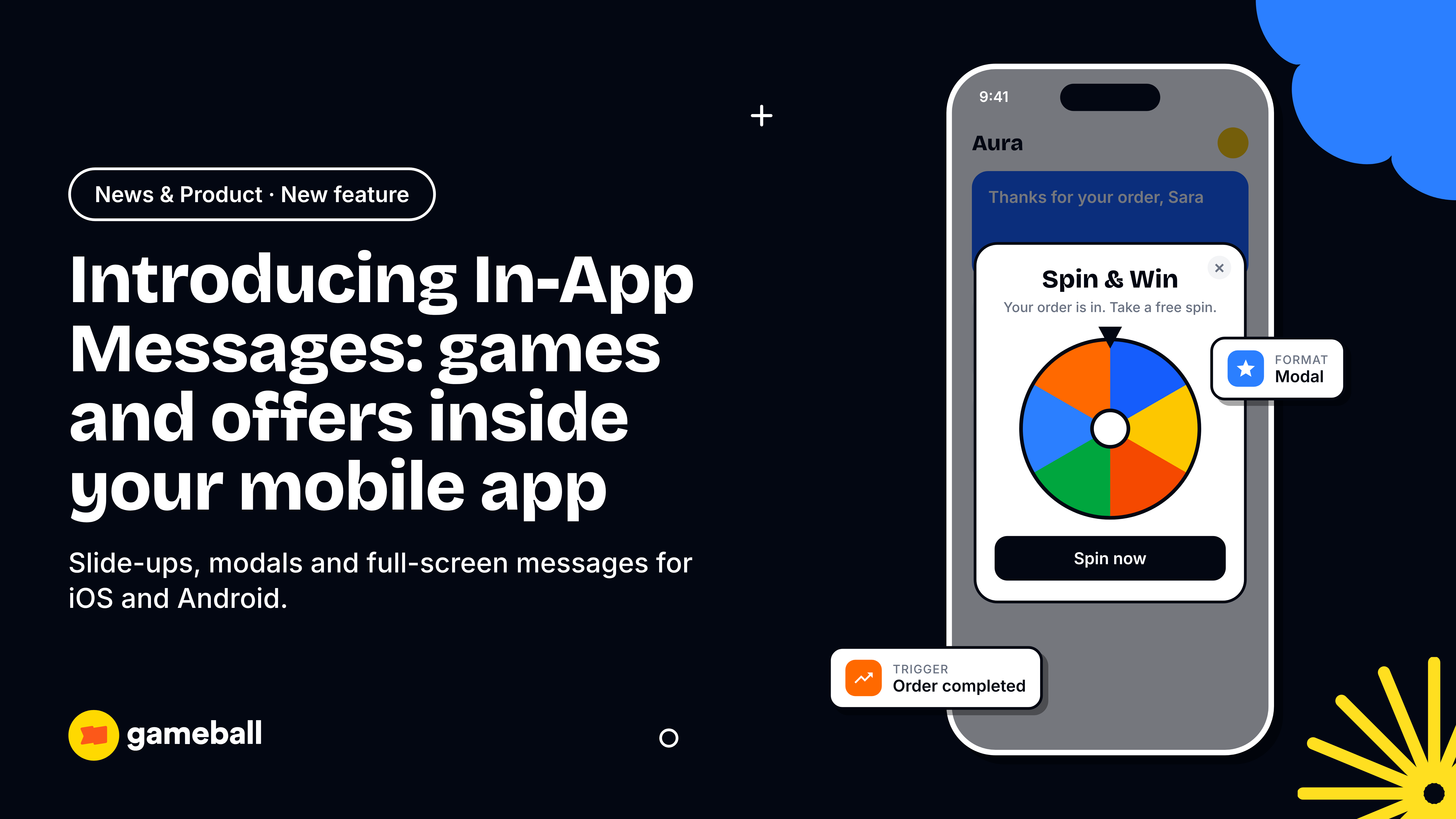
In-app messages are slide-ups, modals and full-screen messages that appear inside your mobile app while a customer is using it, targeted to a segment and triggered by what that customer just did. Gameball In-App Messages is now live, so you can launch them in your iOS and Android app from the same dashboard that runs your loyalty program, games and journeys.
Here is the problem it solves. Customers open your app, do one thing and leave. Meanwhile the spin the wheel, the points balance and the tier they are close to reaching sit inside a widget they have to go looking for. Web messages already brought Gameball campaigns onto your website. In-App Messages brings them into the app itself, in front of the right customer at the right moment. This guide covers the three formats, what can go inside a message, how targeting and measurement work, nine use cases, and how to launch your first message.
What are in-app messages?
In-app messages are messages shown inside your app during an active session, while push notifications reach a customer outside the app to bring them back in. Because the customer is already in the app, an in-app message can respond to what they are doing right now: viewing a cart, finishing an order, or opening the app for the first time in two months.
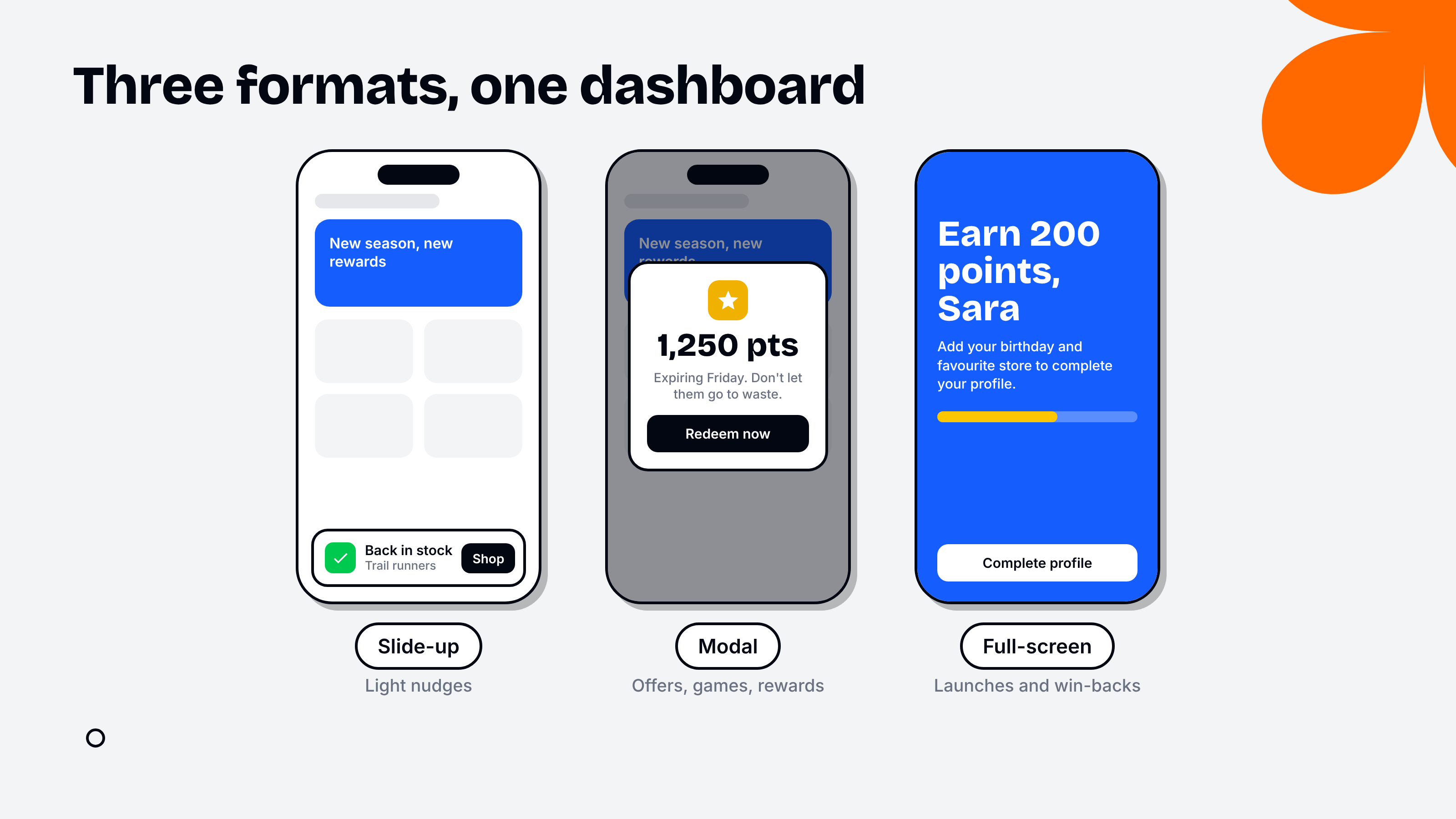
Gameball In-App Messages supports three formats:
- Slide-up: a small bar at the top or bottom of the screen, for light nudges such as a back in stock alert.
- Modal: a pop-up card in the middle of the screen, for offers, games and reward moments.
- Full-screen: an overlay that covers the whole screen, for launches, onboarding and big win-back offers.
Here is how in-app messages compare with the two channels most teams already run.
| Channel | Where it appears | When it works best | Typical job |
|---|---|---|---|
| In-app message | Inside your app, during a session | While the customer is active and paying attention | Nudge the next action, reveal a reward, run a game |
| Push notification | Lock screen and notification center | When the customer is outside the app | Bring the customer back into the app |
| The customer's inbox | Longer content the customer reads later | Summaries, receipts, newsletters, win-back offers |
The channels work best together: push brings the customer back, and the in-app message turns that visit into an action. Our earlier guide on using push notifications and in-app messages together covers how to pair them.
Why in-app messages matter for retention
In-app messages matter because the app session is the one moment you know a customer is paying attention, and most apps lose that attention fast. OneSignal's 2024 mobile benchmarks put average day one app retention at 28.29% and average 30 day retention at just 7.88% (OneSignal Mobile App Benchmarks 2024). The same report found that apps showing 6 to 10 in-app messages a week reported the highest average session length.
Personalization is the other half of the case. McKinsey found that 71% of consumers expect companies to deliver personalized interactions, that 76% get frustrated when this does not happen, and that personalization most often drives a 10 to 15 percent revenue lift (McKinsey). An in-app message targeted by segment, tier or recent behavior is personalization delivered at the moment it counts. To see where this fits in a wider plan, read our companion guide to retention marketing, which maps how lifecycle messaging, loyalty and win-back work together.
What's new in Gameball In-App Messages
Gameball In-App Messages gives your marketing team three formats, flexible content and built-in actions, all designed and previewed in the dashboard, without an app release for every campaign.
Slide-up, modal or full-screen, on iOS, Android or both from one campaign.
Text and image, or image only, with animated GIF support. Up to two buttons, with labels set per language.
Insert fields such as the customer's first name or points balance, so a message like “You've unlocked Gold, Sara” writes itself.
Send customers to an in-app page, open a web page, or ask for a permission such as notifications.
You set the message, header and button colors, then check a live preview for iOS and Android before you launch. The permission action is more useful than it looks: OneSignal notes that apps which introduce the native push prompt with an in-app message first see higher opt-in rates, so one in-app message can grow your push audience too.
Games, surveys and loyalty elements inside the message
This is the part we are most excited about. A Gameball in-app message can hold a spin the wheel, a scratch card or a quick survey, so customers play right where they already are instead of hunting for the widget. Points balances, tiers and stamp cards can appear in the message too, which is what turns a reminder into a reason to act. If you are new to these mechanics, our guides to scratch and win campaigns and gamified rewards programs explain how each one drives repeat purchase, and the full library lives in Gameball gamification.
- Customers have to find the widget to play
- Only your most engaged customers ever see the game
- Points about to expire go unnoticed
- Everyone sees the same experience
- The game opens in a modal right after the right action
- Each segment sees the game built for it
- Expiring points appear with a Redeem now button
- Survey answers are saved to the customer profile for targeting
How targeting and triggers work
Every in-app message answers four questions: who sees it, when it shows, how long it runs and on which platform. You set all four in one screen.
Guests who have not signed in, registered members, or a segment built from tiers, purchases, inactivity or any custom attribute.
On app open or session start, after an event you track such as add to cart, or from an automation such as a tier upgrade or an item coming back in stock.
Fixed start and end dates for a campaign, or ongoing for always-on moments, with an option to show it once per customer.
iOS, Android or both, with a live preview of each before launch.
Targeting uses the same Gameball segments as your web messages and journeys, so an in-app message can also be one step in an automated flow built in Gameball marketing automation: a customer moves up a tier in your loyalty program, and a modal celebrates it the next time they open the app. Guest targeting matters as well. A full-screen message aimed at guests can push sign-ups, an audience a loyalty program alone cannot reach.
How to prove an in-app message actually worked
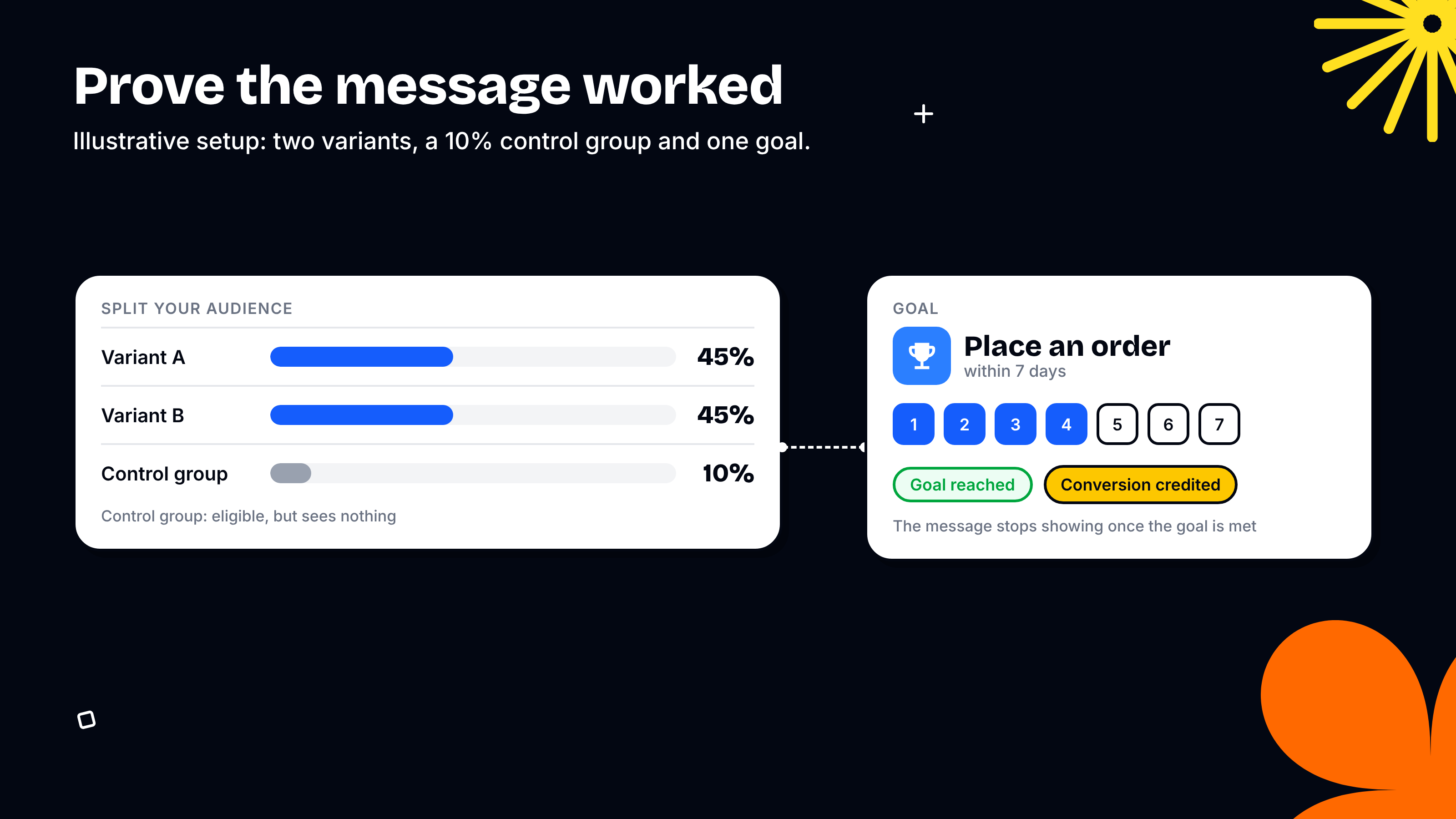
You prove an in-app message worked by splitting your audience into variants and a control group, setting a goal, and reading the difference. Gameball builds all three into the campaign:
- A/B variants: test a different image, different copy, or even a different format, such as a modal against a full-screen message, and split customers between them.
- Control group: hold back a share of eligible customers, for example 10%, who qualify for the message but never see it. Some customers would have come back anyway, and the control group shows you the difference.
- Goals: track a specific event in a time window, such as placing an order within 7 days. Once a customer reaches the goal, the message stops showing to them and the conversion is credited to the campaign.
Open and click rates tell you a message was seen. Only the gap between the campaign group and the control group tells you it changed what customers did. Keep a control group on every always-on message, and judge results by business metrics such as your churn rate and loyalty redemption rate, not clicks.
Results sit in Gameball analytics next to your other channels, so you can see whether in-app, push or email moved the goal for each segment.
How Gameball keeps in-app messages helpful, not spammy
Priority, frequency rules and quiet hours apply across every campaign, so each customer sees the most important message rather than every message you have running.
- Priority levels (High, Medium, Low) decide which message wins when several qualify, so a flash sale ending tonight beats weekly tips
- Frequency rules apply across the whole platform, capping how many messages one customer sees across all campaigns
- Quiet hours, such as 10 PM to 8 AM, stop messages while customers sleep
- A message stops showing as soon as the customer reaches its goal
- Once per customer settings stop prompts like profile completion from repeating
These rules protect the channel itself. A customer who sees one relevant message a session keeps paying attention to the next one.
9 in-app message examples you can launch this week
The nine use cases below are the ones brands are setting up first, each with its audience, trigger and format. Watch the walkthrough, then use the table as your starting point.
| Use case | Who sees it | Trigger | Format | What it drives |
|---|---|---|---|---|
| 1. Checkout upsell | All customers | View cart event | Slide-up | Bigger orders at the moment of purchase, goal: order within 7 days |
| 2. Points about to expire | Segment: points expiring soon | Session start | Modal | Expiring points turned into redemptions |
| 3. Profile completion | New members | Session start, once per customer | Full-screen | Richer profiles for better targeting |
| 4. Spin and Win after every order | All customers | Order completed event | Modal with a Spin and Win game | A reward at the end of every purchase |
| 5. Win back quiet customers | Segment: no order in 60 days | Session start | Full-screen | A capped 10% off or free delivery, goal: order within 7 days |
| 6. Celebrate tier upgrades | Members who reach a new tier | Automation: tier upgraded | Modal | New status that feels like a moment |
| 7. Review requests | Customers whose order was delivered | Automation: order delivered | Modal | Reviews collected while the order is fresh |
| 8. Back in stock | Customers who viewed the item | Automation: item restocked | Slide-up on next app open | Interest turned into orders |
| 9. Stamp campaigns | Segment: one order from the reward | Session start | Modal showing stamps, voucher and time left | Higher order frequency |
The right first use case depends on your business. Retail and ecommerce brands usually start with checkout upsells, back in stock alerts and review requests. Banking and wallet apps in fintech lean on onboarding nudges toward a first transaction and on tier and points reminders. On-demand and delivery apps get the most from free delivery offers, order milestone games and daily habits built with streak campaigns.
How to set up your first in-app message in Gameball
To create an in-app message, go to Campaigns, then Communication, then Create Communication Campaign, and pick In-App. The walkthrough below shows every step, from choosing the audience to designing the message.
Campaigns, Communication, Create Communication Campaign, then In-App.
Guests, registered members, a segment or any custom attribute.
App open or an event, a start and end date or ongoing, on iOS, Android or both.
Pick slide-up, modal or full-screen, add text, an image and up to two buttons, then check the live preview.
Add variants, a control group and a goal, set the priority, then go live.
In-App Messages is available now. Talk to your account manager to switch it on for your app.
- In-app messages reach customers inside your app while they are paying attention, as slide-ups, modals or full-screen messages.
- A Gameball in-app message can hold a spin the wheel, a scratch card, a survey or a loyalty element, so games come to the customer instead of waiting in a widget.
- Target guests, members or any segment, and trigger messages on app open, after an event, or from an automation such as a tier upgrade.
- Prove impact with A/B variants, a control group and a goal such as an order within 7 days.
- Priority, platform-wide frequency rules and quiet hours keep messages helpful, not spammy.
How Gameball helps
Gameball In-App Messages runs on the same platform as your loyalty program, games and gamification, promotions and journeys and automation, so every message already knows each customer's tier, points and history, and every result lands in one analytics view. To see In-App Messages running on your own app, book a demo.
Related reads
- Gamified Rewards Programs: The Mechanics That Drive Repeat Purchase
- Scratch and Win Campaigns: How to Run Them Without Killing Your Margin
- Retention Marketing: How to Build a Retention-First Growth Engine
Frequently asked questions
What are in-app messages?
In-app messages are slide-ups, modals and full-screen messages shown inside a mobile app while the customer is using it. Unlike push notifications, they only appear during an active session, so they can react to what the customer is doing at that moment, such as viewing a cart, finishing an order or reaching a new loyalty tier.
What is the difference between in-app messages and push notifications?
Push notifications reach customers outside your app, on the lock screen, to bring them back. In-app messages appear inside the app once the customer is already there, to guide the next action. Most retention programs use both: push drives the visit and an in-app message turns that visit into an order, a redemption or a sign-up.
Can a Gameball in-app message include a game?
Yes. A Gameball in-app message can hold a spin the wheel, a scratch card or a quick survey, and it can show loyalty elements such as points balances, tiers and stamp cards. Customers play inside the message without opening the widget. Games use your Gamification module, and points or tier elements use Loyalty and Rewards.
Which platforms does Gameball In-App Messages support?
Gameball In-App Messages runs inside iOS and Android apps, and each campaign can target iOS, Android or both, with a live preview for each platform. Gameball web messages cover your website, so you can reach customers on the website and inside the app from the same dashboard and the same segments.
How do I know if an in-app message worked?
Set a goal, such as an order within 7 days, and hold back a control group of eligible customers who never see the message. Gameball credits a conversion to the campaign when a customer reaches the goal, and the gap between the campaign group and the control group shows the lift the message actually caused.
How is Gameball In-App Messages priced?
In-App Messages is a channel inside the Journeys and Automation module, alongside email, mobile push, web messages and automated journeys. The module is priced on Monthly Contacted Customers, the unique customers you reach in a month, not the number of messages. If outbound communication is already in your contract, In-App is included.
Will in-app messages annoy my customers?
Not if you use the guardrails. Gameball applies priority levels, frequency rules across every campaign and quiet hours, such as 10 PM to 8 AM, and stops a message once the customer reaches its goal. Each customer sees the most relevant message for them rather than everything you have running.
.svg)
.svg)
.svg)

Ready to level up your game?
Create your first campaign and start seeing results in 30 days.
Ready to grow?
Get in touch with our sales team today.
The loyalty vendor checklist your CTO
will thank you for
Discover engineering challenges, essentials, and more from global brands.

Gameball Staff
Stay ahead on retention
Subscribe to our newsletter and get all the latest updates as we post.

Ready to level up your game?
Create your first campaign and start seeing results in 30 days.
Read related articles


Ready to level up your customer loyalty?
Level up your customer loyalty!


.avif)
.avif)
.avif)
.avif)